
Ways to Use Google Data Studio To Improve Your SEO
Google Data Studio is a popular tool to visualize your data and extract insights. It is now integrated with Looker (actually , now called Looker Studio), making it a powerful tool for business intelligence and analytics.
Looker Studio can connect to any third-party data source, such as Google Ads and Facebook Ads. But for SEOs, Connecting to Google Analytics and other SEO tools will give you endless opportunities to increase your visibility, traffic, rankings and site experience.
We’re going to show you five ways that Google Looker Studio can improve your SEO.
Five ways Google Data Studio (Looker), can be used to improve SEO
Data Studio can be connected to your SEO reporting tools, such as Google Analytics, Search Console and others. This will allow you to analyze organic performance, track site engagement, track goal completions and compare traffic sources. What is the result? Increased traffic to your website and increased sales. These are the steps to take.
1. Analyze organic traffic
Google Data Studio offers many connectors that allow you to track organic traffic and trends in engagement.
Connecting to Google Analytics is the best way to track organic performance. Here’s how:
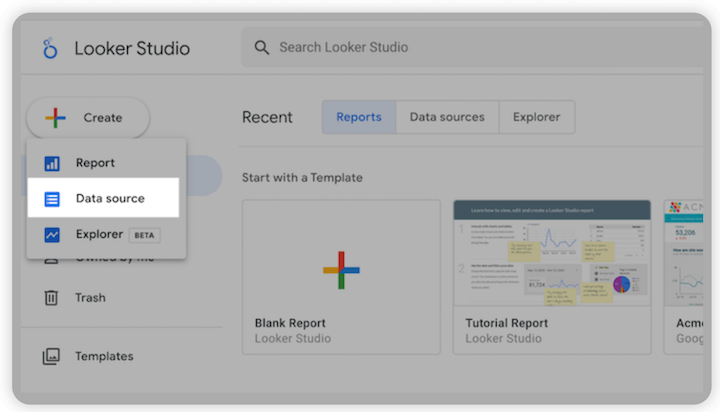
- Log into your Data Studio (https://datastudio.google.com/) and click “Create”
- Click “Data source”
- Google Analytics
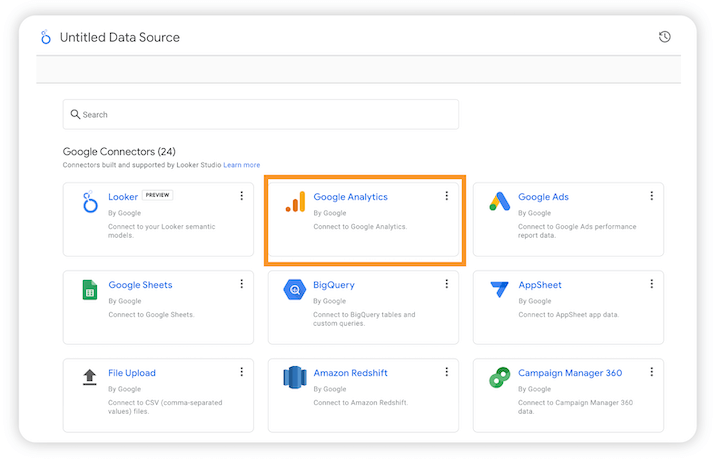
- You can automatically import data from images, videos or URLs if you have already set up the property parameters. You can also manually choose the parameter you want using the filters. Google has a help page for properties.
- Filters and dates can help you narrow down your data. Filter your data by country, channel, web pages, type of device, or country.
These are some things you should keep an eye on:
- Clicks and CTR. Connect to Google Search Console to view clicks and CTR. The best representation is a line chart. You can then use the weekly date range for specific days to see trends. You can see a shift in the pattern over weekends, for example.
- Particular pages. Use the page filter option to see traffic patterns on specific pages or sections of your website. To make a more clear comparison between pages or groups of pages, you can use a table or spreadsheet. This is a great way to conduct a content audit.
- Keyword performance. To track keyword performance, Data Studio can be connected to Google Analytics, Search Console queries or other SEO tools such as Ahrefs, Moz, and Google Analytics. The data source that you use will affect the metrics you see. Moz has many connectors that allow you to track SERP visibility. These include keyword rankings and changes as well as click share and ranking distribution. You can manually add your chosen tracker if they aren’t an official connector.
You may need to improve your on page SEO if you notice a decline in keyword performance. Our Free Keyword Tools will help you find keywords to target.
2. Monitor site search data
You can optimize your content and website architecture by understanding the terms that your website visitors search for when they visit your site. This functionality is not available in Google Analytics, so you will need to add a widget. This Analytics Mania article shows you how to set-up site search insights in Google Analytics 4 through creating a view_search_results events and how to connect with Data Studio.
3. Keep track of your goals
Google Data Studio makes it easy to track your goals without switching between windows. Integrate with Google Analytics to track your goals from your Data Studio dashboard.
This will allow you to see the ROI of your campaigns, and identify clues to increase your conversion rates . Here’s how.
- Click on the Add Chart tab in Google Analytics to choose Scorecard.
- Select your metric, and then add your goal. In this case, the goal is to lower the bounce rate by 30%. The goal comparison is in percentages. So the target will be 30% divided the current rate.

- You can choose to display the ratio in percentages or points and visualize it using the chart of choice. This allows me to easily show my client how close I am to reducing the bounce rate.
4. Examine traffic sources
Google Data Studio (Looker Studio) allows you to track which traffic sources are most effective in driving your goals. This includes search engines, social media platforms, apps, marketplaces and many other sources.
All of these factors will help you find new traffic sources and create a solid multichannel marketing plan.
Although your dashboard can be connected to many platforms for tracking traffic, the Google Analytics connector brings them all together.
Here’s an example of how to track the traffic from social networking ads.
- Start your Google Analytics connector, and then go to Chart Data.
- Choose your data source. Facebook ad tracking, YouTube ad tracking, etc.
- Choose the chart type you prefer. Certain charts are better suited for certain purposes. A line chart that compares traffic from different age groups will show you the dominant age group.
- Finetune your output. Filter further by specifying how many visitors were converted and the time frame.
Some quick tips:
- Compare comparison tables and charts. You can also show a correlation between ROI and seasons by comparing the returns for peak seasons and lull season periods.
- Track your return. To find the most profitable channels, you can also track your cost-per-result. Select a table or stackable chart as your chart type. Next, enter the ad costs, impressions and clicks. Select the timeframe to compare, and that’s all. We will show you the steps to import cost data into Google Analytics.
5. Analyze backlinks
You need high-quality backlinks to rank higher in Google. You can connect your SEO tool with Google Data Studio to track which referral links are getting the most traffic. There are many functionalities that you can use to track referral hyperlinks. It all depends on the connector you choose, but these are some tips.
- Find high-potential referral resources. Don’t look at traffic volume through your referral links. You could be missing out on high traffic sources. Instead, look for percentage increases in traffic. You might notice a spike in traffic due to a referral link. This site could be a great place to reach out and create more links.
- Track links within categories. For easier tracking and referencing, you can use your dashboard’s filter. You might, for example, exclude old backlinks or social media referral links.
Use Google Looker Studio to start SEO now
With the Looker integration, marketers and SEOs now have more power in their Google Data Studio dashboard. The list of platform partners is growing every day. These are the best ways to extract valuable insights from your website in order to increase traffic, rank, and user experience.
- Organic performance
- Site search
- Completion of goals
- Traffic sources
- Profile for Backlink
Give it a try today!
About the author
Alex Medawar, a digital media veteran, specializes in B2B paid-search campaign management and strategy for global brands within the tech sector. Small businesses as well as large corporations can communicate with their target audience and achieve results in the digital media landscape by using a data-driven approach. For more information, tools and resources, visit alexmedawar.com
WordStream first published the post 5 ways to use Google Data Studio to improve your SEO.